How to Look Up a DOT Number (and What the Results Mean)
Updated Oct 25, 2026 · General information, not legal advice. Confirm requirements on the official FMCSA source.
For a DOT number lookup, search the complete USDOT number in FMCSA’s Motus public search, then open the same carrier in SAFER for safety information. If you have only a company name, MC number, or phone number, use a search that accepts that detail to find a possible match. Confirm the USDOT number and company identity before relying on the result.
What a USDOT number identifies
FMCSA assigns a USDOT number to identify a regulated entity and connect its registration with safety information. An MC number refers to an operating-authority docket, so it serves a different purpose. A company may need both. Whether operating authority is required depends on the kind of service it performs, which is why finding a USDOT number is only the start of a carrier review. If you are applying for authority yourself, our guide on how to get an MC number walks through the Motus steps.
Check the required authority separately from USDOT status. An active identifier cannot verify a dispatcher or show that the truck at pickup belongs to the company. Connect the public record to the business and people handling the shipment.
Three ways to look up a DOT number
1. Search by USDOT number
Enter the entire USDOT number in FMCSA Motus public search ↗. The search requires an exact number, so check for a missing digit if nothing appears. Motus may show letters after the number in its results, such as 1843980(CV); they describe the registration types and are not part of the USDOT number, so search the digits only. Open the company record and use the same number in the SAFER Company Snapshot ↗ to review its safety information. (FMCSA public search) ↗
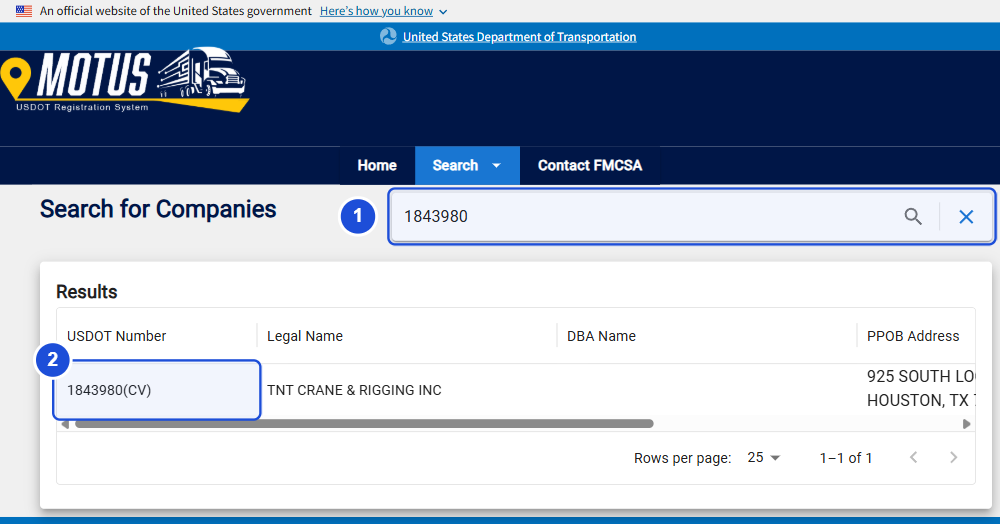
Compare the returned legal or DBA name and location with the carrier’s paperwork. A valid USDOT number can lead to a real business even when the person who supplied it has no connection to it, so confirm you have the intended carrier before moving on to the status fields.
2. Search by company name
Start a Motus name search with the beginning of the legal or DBA name. A word from the middle of the name will not work as a general keyword search. Compare the result’s location and USDOT number with the packet or rate confirmation. SAFER also accepts company-name searches, giving you another route to the identifier when you do not yet have a number. (FMCSA public search) ↗
Businesses can share parts of a name, and a trading name may differ from the registered legal name. If the results and paperwork do not match, ask for the USDOT number and search that exact number.
3. Search by phone number
The Motus public search offers USDOT number, legal name, and DBA searches, with no phone-number field. A third-party phone lookup can help identify a possible company when a number is all you have. Treat that result as a lead, then compare the company and its contact details with the official FMCSA record. (FMCSA public search) ↗
HaulerCheck accepts phone numbers in its search box. When a company appears, open the report and compare its name, USDOT number, and phone details with Motus. A failed search does not mean the caller is a fraud. It means the number has not given you a reliable match, so you need another way to find out which registered company is involved.
How to look up a carrier on HaulerCheck
- Visit HaulerCheck.
- Search with the detail you have: a USDOT or MC number, phone number, company name, or city.
- Open a result only after checking its company name and USDOT number against the business you are researching.
- Read the authority and insurance sections. The line under each field shows its source: “FMCSA Motus” when FMCSA has published a Motus record for the docket; otherwise the field comes from FMCSA’s May 14, 2026 records, with no change recorded since.
- Follow the Motus link to confirm current registration and the SAFER link to review the safety snapshot.
- Compare the record with the contact details, insurance certificate, and load documents. Confirm changed instructions through a number already on the official record.
The TNT Crane & Rigging sample report shows how authority and insurance sections appear beside inspection and crash information, with source dates and direct links to Motus and SAFER. A green card means the fact is on file in the FMCSA record; it does not confirm who you are talking to, or that a policy covers your specific load.
Our data sources page explains which fields come from the daily Motus files and which from FMCSA’s May 14, 2026 records. The state directory helps when location is your starting point.
Official alternatives: Motus and SAFER
Motus holds registration records, including published authority and insurance information. SAFER’s Company Snapshot provides identification details, USDOT and authority status as of the snapshot date, safety ratings when available, and inspection and crash summaries. Use both to review the carrier’s registration and safety history.
The search inputs also differ. SAFER accepts USDOT numbers, MC/MX numbers, and company names; Motus accepts a USDOT number, legal name, or DBA. If a dispatcher gives you only an MC number, search it in SAFER or HaulerCheck to find the associated USDOT record, then search that USDOT number in Motus to confirm you are checking the same company’s registration. (FMCSA safety guidance) ↗ (FMCSA public search) ↗
FMCSA directs users to Motus for filing and motor-carrier record activity after May 18, 2026. Older downloaded registration files may describe an earlier status, so compare their dates when a result differs from Motus. (FMCSA filing guidance) ↗ Our SAFER vs Motus guide explains how to make that comparison without confusing registration changes with safety history.
How to read the results
| Result field | What it can tell you | What to check next |
|---|---|---|
| USDOT status | Whether the USDOT record is shown as active or inactive | Confirm that the record belongs to the company taking the load. |
| Operating authority | Whether a specific authority is shown as active, pending, suspended, or revoked | Check the exact authority type and the Motus source, not just the USDOT status. |
| Insurance filing | What insurance-related filing appears on the record | Confirm policy details and load-specific coverage with the appropriate parties. |
| Safety rating | A rating when one has been issued | Do not treat a missing rating as an approval or failure. |
| Inspections and crashes | Reported roadside activity and crash counts over a stated period | Read the dates and remember that larger or more frequently inspected fleets may have higher counts. |
| MCS-150 / company details | Filed company and operation information, such as fleet and contact details | Compare dates and confirm recent changes with the carrier. |
Read the full status and any reason shown in Motus. “Pending” describes an application or action that is not final; it does not grant authority. “Inactive,” “suspended,” and “revoked” can refer to different conditions on an identifier or an authority record, so check which record the label belongs to before deciding what it means for the shipment.
Red flags and mismatches to investigate
- The number resolves to a different legal company from the one named on the rate confirmation.
- The dispatcher’s MC number is not associated with the USDOT record supplied for the load.
- Contact or payment instructions have changed, and nobody has confirmed the change through a known company contact.
- A third-party report shows active authority, while Motus has a newer status or a different authority type.
- Several records or dockets appear, and the contact cannot explain which company will perform the work or which authority applies.
- The insurance certificate names another entity or conflicts with the filed policy information.
- The claimed operating history predates a recent registration or authority. Ask about the difference and compare the histories separately; a new registration alone is not evidence of wrongdoing.
- Someone points to the size of a USDOT or MC number as proof of how long the company has operated. New numbers issued in Motus are randomized, so check the registration and authority dates instead. (FMCSA registration changes) ↗
These are reasons to pause and investigate before releasing freight. None proves fraud by itself. FMCSA has warned against the unauthorized sale, purchase, or lease of USDOT numbers and operating authority, and genuine company details can also be impersonated. Resolve the mismatch with the carrier through a verified channel, keeping the documents and lookup dates that explain what you found.
Our MC number lookup guide follows a docket back to the company and authority that hold it. Throughout the review, keep USDOT status and authority status apart: the identifier and the permission to perform a service need separate checks.
If a search returns no match
Recheck the complete USDOT number for missing digits. With a Motus name search, use the beginning of the legal or DBA name and compare spellings on the company’s documents. A third-party site may also have search or coverage limits. If the identity is still unclear, ask for the USDOT number and resolve it through the official record or FMCSA support before booking.
Frequently asked questions
Can I do a DOT lookup by company name?
Yes. Both Motus and SAFER accept company-name searches. Check the returned USDOT number and location against the company’s documents.
Can I search by phone number on FMCSA?
The Motus public search options are USDOT number, legal name, and DBA. HaulerCheck offers a third-party phone search; use FMCSA’s record to confirm a possible match.
Does an active USDOT number mean the carrier is authorized?
An active USDOT record alone does not show that the company holds the authority required for the load. Open the relevant authority in Motus and check its status.
Is SAFER enough to verify a carrier in 2026?
Use it for the safety snapshot, alongside Motus for current registration. Compare dates and investigate conflicting results before relying on either record.
Is a DOT number lookup proof that a caller is legitimate?
No. An impostor can supply a real carrier’s number. Confirm the shipment and the person’s connection to the company through a known contact or the number on the official record.
Official sources
Checked October 22, 2026.
- FMCSA: Motus public company search ↗
- FMCSA: What can I do in Motus ↗ — Updated May 21, 2026.
- FMCSA: Company Safety Records ↗ — Updated June 23, 2023.
- FMCSA: SAFER Web Frequently Asked Questions ↗
- FMCSA: Do Not Sell Purchase or Lease a USDOT or MC Number ↗ — Issued March 19, 2026.
- FMCSA: About FMCSA Registration Changes ↗