SAFER vs. Motus: Where to Check a Carrier’s Authority and Insurance Now
Updated Oct 23, 2026 · General information, not legal advice. Confirm requirements on the official FMCSA source.
Use SAFER for a carrier’s safety snapshot and Motus for its current FMCSA registration, including authority and published insurance filings. If the two show different statuses, first match the USDOT number and compare the field and source date. An older registration entry should not settle whether the carrier has the authority needed for today’s load.
SAFER and Motus at a glance
| Information to check | SAFER Company Snapshot | Motus public record | What to keep in mind |
|---|---|---|---|
| Company identity | Name, USDOT number, and company details | Business information linked to the USDOT record | Match the identifier and read the record date. |
| USDOT and authority status | USDOT and operating authority status, as of the date printed on the snapshot | Current company and specific authority records | SAFER can trail Motus by a day or two; confirm same-day status in Motus. |
| Insurance filings | No filing details; its Licensing & Insurance link opens the Motus record | Insurance Details tab on each authority’s detail page | Read the status, effective dates, and any cancellation date. |
| Safety rating | Rating when one has been issued | Not shown | No rating means FMCSA has not rated the carrier; it is neither a pass nor a fail. |
| Inspections and crashes | Summaries for the previous 24 months | Not shown | Counts are updated weekly. |
| Access | Public snapshot needs no carrier login | Public search needs no carrier account access | Sign-in is for authorized account management. |
Start by matching the USDOT number in both results. A shared company name is not enough, particularly when a search returns several similar businesses. FMCSA describes SAFER’s safety services on its Company Safety Records page and directs users to Motus for registration activity after May 18, 2026. That division tells you where to check next when a packet or saved report raises a question. (FMCSA safety guidance) ↗ (FMCSA filing guidance) ↗
What FMCSA SAFER shows
SAFER stands for Safety and Fitness Electronic Records. Its free Company Snapshot gives a concise view of one company at a time: identification, size, commodity information, and safety record, including the safety rating (if any), roadside inspection out-of-service summaries, and crash information. It also lists the USDOT status, operating authority status, and MC/MX/FF numbers, and its Licensing & Insurance links now open the company’s Motus record.
A SAFER DOT lookup on the SAFER Company Snapshot ↗ works by USDOT number, MC/MX number, or company name. An MC/MX search is particularly useful when a dispatcher has supplied a docket number and you still need to find the associated USDOT record. Once you have that identifier, use it for the rest of the review to avoid picking a different business with a similar name.
Not every field refreshes on the same schedule. SAFER’s FAQ says snapshot data is updated daily, while inspection and crash counts are updated weekly and cover the previous 24 months. Each snapshot also states the date its data reflects; the one we checked on October 22, 2026, was current as of October 20. For same-day authority or insurance status, check Motus. (SAFER FAQ) ↗
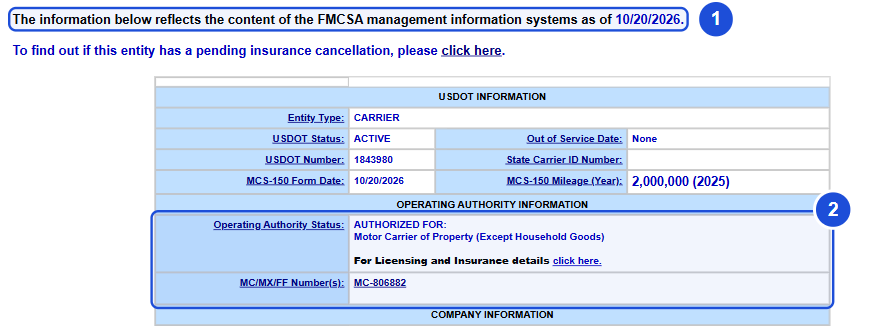
Some carriers have no safety rating on the snapshot. That absence is neither an endorsement nor a warning from FMCSA. Raw inspection and crash counts also need context: fleet size, routes, and inspection exposure can affect the totals. The snapshot gives you figures to examine within your qualification process; it does not include every underlying document or settle every safety question.
What Motus shows
Motus is FMCSA’s USDOT Registration System. Companies use their accounts to apply for and manage registrations, update business information, submit biennial updates, follow registration actions, and manage user access. A broker reviewing a company uses the public search instead. There is no need to log into the carrier’s private account or obtain permission to change its record.
For a current authority check after the 2026 transition, open the company’s Motus record and select the authority that applies to the service. A business can hold more than one authority type. An active entry for one of them says nothing conclusive about another, so read the relevant authority’s status and insurance filing details together.
An insurance filing has a narrower purpose than a full policy. For example, a liability filing does not establish cargo coverage for the shipment you are booking. Match the named insured and dates to the company doing the work, then obtain the certificate and any insurer confirmation the load requires. FMCSA’s filing requirements depend on the entity, authority, cargo, and vehicle type. (FMCSA insurance guidance) ↗
Why SAFER and Motus can disagree
The transition dates explain some discrepancies. Legacy registration functions began going offline on May 14, 2026; general users could create Motus accounts from May 19. FMCSA directs users to Motus for record activity after May 18, so a registration file saved before that move can describe an earlier status than a current search. SAFER can also trail Motus by a day or two, because each snapshot reflects FMCSA’s systems as of a stated date. (FMCSA account FAQ) ↗ (FMCSA filing guidance) ↗
Consider a saved result that shows active authority, while Motus shows a later suspension or revocation. The dates may account for the difference. A site that republishes FMCSA files may also be missing a newer record. Before drawing either conclusion, check whether both results belong to the same USDOT number; a similar name or an unexpected docket association can send a search to the wrong company.
Once the identity matches, open the specific authority in Motus and compare it with the older result. Keep SAFER open for the safety information rather than asking it to settle a registration discrepancy. If the official records still leave the status unclear, keep the lookup date and ask FMCSA or the company to clarify.
HaulerCheck shows the source and date under every authority and insurance field. Where FMCSA has published a Motus record for a docket, the report uses the daily Motus files. Otherwise it shows FMCSA’s records as of May 14, 2026, which have not changed since, because FMCSA publishes every later change in Motus. Our data sources and freshness page explains each source. Neither is a live check, so compare the report with Motus before booking.
The sample carrier report puts authority, insurance, safety information, and official verification links together. In Motus, authority details sit apart from the company’s overall USDOT status, so follow the relevant authority through to its detail page. Our FMCSA Motus explained guide covers the account changes and the move from the older systems.
A safer carrier-check routine for brokers
- Find the company by USDOT number. Compare its legal or DBA name, address, and listed contact information with the carrier packet.
- Open the Motus public record. Review the authority type required for the shipment and the status attached to that authority.
- Check the applicable insurance filings. Obtain the certificate or insurer confirmation required for the contract and cargo.
- Read SAFER’s safety rating, inspection summary, and crash information, noting the period covered and whether a rating exists.
- Resolve mismatches before booking. Call a number already on the official record when the packet or dispatcher’s details differ, and ask the carrier or FMCSA to clarify the record.
- Confirm unfamiliar contact, pickup, or payment instructions through a known channel. A valid number on a public record does not authenticate the person using it.
If you are starting with incomplete information, HaulerCheck’s carrier lookup accepts a USDOT number, MC number, phone number, company name, or city. Follow the matching report’s Motus and SAFER links for the official checks. The state directory is another way to narrow the search when you know where the business is based but are unsure of its registered name.
Which result should control?
Let the question determine the source. Motus is the place to confirm the current registration and relevant authority or insurance filing. SAFER supplies the safety snapshot. Keep both lookup dates if the results disagree and identify the exact field in dispute when seeking clarification. A broad “active” label cannot explain whether the disagreement concerns an identifier, a particular authority, or older data.
Active authority is not a safety endorsement. Keep registration, insurance, safety, and identity checks separate, using the source that answers each question.
Keep a record of the verification
Keep the USDOT number, lookup date, authority type, and source used for the review. If the record changes, keep enough detail to show how a discrepancy was resolved. A screenshot preserves what was displayed when you checked; confirm coverage questions with the insurer.
For example, a packet might include an earlier safety rating while Motus shows a later authority change. Record both dates and resolve the registration question through the current authority record before booking. The safety rating still needs its own review; a favorable result in one field does not settle the other.
Frequently asked questions
Is FMCSA SAFER still active after Motus launched?
Yes. SAFER continues to provide the Company Snapshot and safety information. Motus is the source for current registration-record activity after the transition.
Does SAFER show current operating authority?
It shows operating authority status as of the date printed on the snapshot, which can trail Motus by a day or two, and its Licensing & Insurance link opens the Motus record. Confirm the relevant authority in Motus before booking.
Can I search SAFER by MC number?
Yes. Select the MC/MX search option in the Company Snapshot. You can also search by USDOT number or company name.
Does Motus replace SAFER?
No. The systems have different jobs: Motus handles registration records and actions, while SAFER provides the safety snapshot.
Why might two sites show different information?
Check that you have the same USDOT number first. Then compare the authority type, source file, and date; the sites may be displaying records from different periods.
Is SAFER data updated daily?
The FAQ describes daily snapshot updates, with inspection and crash counts updated weekly. Check the specific field and date rather than assuming every entry reflects a live registration lookup.
Official sources
Checked October 22, 2026.
- FMCSA: Move into Motus ↗ — Updated May 18, 2026.
- FMCSA: What can I do in Motus ↗ — Updated May 21, 2026.
- FMCSA: When can I create my user profile and company account ↗ — Updated May 22, 2026.
- FMCSA: Transition to Motus Begins May 14 ↗ — Issued May 12, 2026.
- FMCSA: SAFER Web Frequently Asked Questions ↗
- FMCSA: Company Safety Records ↗ — Updated June 23, 2023.
- FMCSA: Insurance Filing Requirements ↗ — Updated March 26, 2026.
- FMCSA: Motus public company search ↗