MCS-150 Biennial Update: Deadline, How to File in Motus, and Penalties
Updated Oct 24, 2026 · General information, not legal advice. Confirm requirements on the official FMCSA source.
The MCS-150 keeps a motor carrier’s USDOT record current, and its regular biennial deadline is set by the last two digits of the USDOT number. To file in Motus, open the company account’s “Biennial Update Information” section and select “Start.” As of October 22, 2026, FMCSA has paused enforcement and USDOT inactivation for updates due on or after June 1, 2026, and is giving extra time without setting a new deadline. (FMCSA transition notice) ↗
What the MCS-150 updates
MCS-150 stands for Motor Carrier Identification Report. The MCS-150 form records company and operation details on a motor carrier’s USDOT record. The applicable form depends on the registrant under 49 CFR 390.19T: interstate motor carriers use MCS-150, intrastate carriers that need a hazardous materials safety permit use MCS-150B, and intermodal equipment providers use MCS-150C. Check which report applies to the company before starting the update. (49 CFR 390.19T) ↗
You still need the scheduled biennial update when nothing has changed. A business that has stopped operating should follow FMCSA’s instructions for inactivating its record rather than leave an outdated registration in place.
Business changes can require attention before the next biennial deadline. FMCSA’s FAQ directs registrants to update information within 30 days of a change, including changes to contact and power-unit information. It also explains when an update made during the 12 months before the scheduled due date can satisfy the biennial filing. Review the accepted filing and current instructions before deciding that the next scheduled year is the next time you need to act. (FMCSA update FAQ) ↗
How to calculate the due date
Read the last digit first to find the due month in the table. Then use the next-to-last digit to determine whether you file in odd- or even-numbered years. Under the regular schedule, the deadline is the last day of that month in the applicable year.
| Last USDOT digit | Due by the last day of |
|---|---|
| 1 | January |
| 2 | February |
| 3 | March |
| 4 | April |
| 5 | May |
| 6 | June |
| 7 | July |
| 8 | August |
| 9 | September |
| 0 | October |
Use the next-to-last digit to choose the filing year:
- Odd next-to-last digit: file in odd-numbered calendar years.
- Even next-to-last digit: file in even-numbered calendar years.
For example, a USDOT number ending in 67 has a July due month because the final digit is 7. The preceding digit, 6, is even, giving a deadline of July 31 in even-numbered years. A number ending in 30 falls in October of odd-numbered years. These examples follow the digits on the identifier; the company’s registration anniversary does not set the schedule.
You can also read the date directly: each company’s public Motus record shows a “Biennial Update Due Date” and a “Last Biennial Update Date.” TNT Crane & Rigging (USDOT 1843980, ending in 80) last updated on October 20, 2026, and Motus lists its next due date as October 31, 2028. (Motus record for USDOT 1843980) ↗
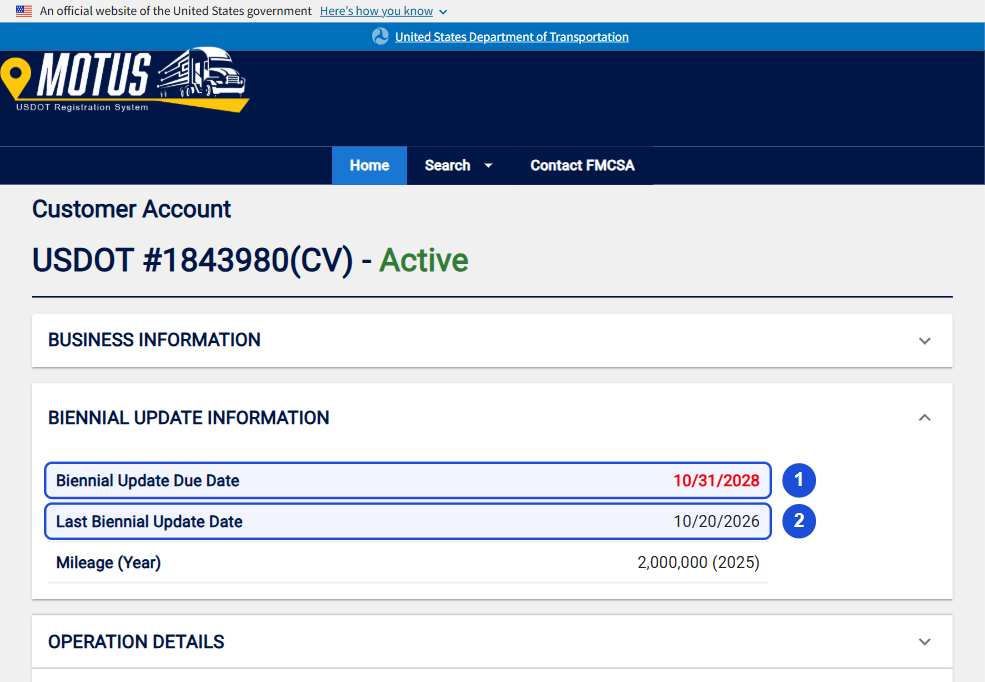
This month-and-year schedule comes from 49 CFR 390.19T. Before filing again, look for an earlier accepted update that may satisfy the scheduled requirement under FMCSA’s guidance. The temporary 2026 pause changes the enforcement consequences described below. It does not remove the regular schedule or turn the update into an optional filing. (49 CFR 390.19T) ↗
Information to gather before filing
Gather the USDOT number, legal name, addresses, and current contact details. Have the requested operation, cargo, vehicle, driver, and mileage information ready, keeping the mileage year with the figures. Use the filing’s definitions to review the details rather than substituting an old truck list or insurance certificate for current company information.
How to file the update in Motus
Use the current Motus account instructions ↗ to get into the correct company account; some older MCS-150 pages still show Portal menus. The steps below follow FMCSA’s company-account job aid. (FMCSA Motus job aid) ↗
- Work out your due date from the last two USDOT digits, or read it on the company’s Motus record. Read the temporary suspension notice ↗ and any notice FMCSA has sent specifically to your company.
- Begin at FMCSA’s official registration page ↗ and open Motus. If entering the address yourself, use motus.dot.gov so you reach the government system rather than a private filing-service advertisement.
- Sign in through Login.gov and complete the required identity verification. To claim an existing record, follow FMCSA’s company-official instructions, including the Login.gov email associated with the former Portal company-official account.
- Open the company account and check its USDOT number and legal name. A company whose record is already linked does not need a new USDOT registration to submit an update.
- Expand “Biennial Update Information” and select “Start.” FMCSA’s job aid identifies this section for the applicable motor carriers and intermodal equipment providers.
- Review the fields against the company information you gathered, make corrections, complete the certification, and submit through the account. If claiming the record or submitting the action fails, ask FMCSA for help before creating a duplicate registration.
- Keep the accepted submission confirmation, filing date, and a copy of the information filed. Record any support case number separately and check the public Motus record after processing.
As of October 22, 2026, FMCSA describes an online biennial update for your own company as free; a private service may charge for helping with it. If you use assistance, keep the Login.gov password and recovery codes private, arrange access through the official account process, and keep the filing documents yourself. Paying a service does not replace checking what was submitted for your company. (FMCSA MCS-150 guidance) ↗
Confirm that the filing was completed
After submitting, make sure the confirmation belongs to the intended USDOT number. A saved draft or support request does not show that an update was accepted. Once the update is processed, the public Motus record shows it as the “Last Biennial Update Date,” and SAFER shows it as the “MCS-150 Form Date.” If the public record still displays an earlier filing, refer to the confirmation when asking FMCSA about processing, before you try again.
Logging in, submitting an insurance filing, or opening a support inquiry is not the same as completing the company-information update. If you cannot tell which filing was accepted, ask FMCSA. An update made within the 12 months before the due date can count as the biennial update, so compare its date with your assigned month and year. (FMCSA update FAQ) ↗
What if you miss the deadline?
Failure to complete a required biennial update can lead to USDOT deactivation and penalties under the statutes cited in 49 CFR 390.19T(b)(4). The penalty category matters. As of October 22, 2026, paragraph (a)(1) of Appendix B to 49 CFR Part 386 lists a recordkeeping maximum of $1,584 for each day a violation continues, up to $15,846. These are the limits for that category, rather than an automatic charge for every late update. (49 CFR Part 386 Appendix B) ↗
FMCSA’s temporary notice, last updated September 10, 2026, gives extra time while Motus recovery and stabilization continue: for updates due on or after June 1, 2026, FMCSA has paused enforcement and will not inactivate USDOT numbers for a missed update. The notice sets no end date and no new deadline, so check its current wording before relying on an older reminder or a third-party deadline. (FMCSA transition notice) ↗
The suspension reaches UCR as well: because MCS-150 vehicle counts may be out of date, the UCR registration site asks carriers to declare every commercial motor vehicle they operate in interstate commerce when they register. Our UCR registration guide covers the 2027 fees and the vehicle count.
A deadline before June 1 falls outside the period expressly described. If the USDOT number is already inactive or the company has received an agency notice, ask FMCSA how the notice applies to that record. Keep the response with the filing documents. The temporary pause should not be treated as automatic reactivation or as a resolution of a separate authority or insurance problem.
If Motus returns an error, save the message and the details of what you submitted, give them to FMCSA, and follow up on the existing support case instead of opening duplicate tickets. A ticket records a request for help; only the account confirmation shows that the update was completed. (FMCSA transition notice) ↗
Why brokers and shippers should care
For a broker, the filing date puts company details in context. MCS-150 information is reported by the carrier, so vehicle counts, mileage, cargo, and contact details can age between updates. HaulerCheck reports, such as the TNT Crane & Rigging sample report, include a “Last MCS-150 update” field taken from FMCSA’s census file. FMCSA adds a new filing to that file about two days after it is made, so the field can trail Motus and SAFER by a few days. For the latest filing date, check the Motus record or the SAFER snapshot. A filing date does not show that every present-day detail is correct or, by itself, that the carrier met its deadline.
Find the company through HaulerCheck’s carrier lookup, or use the state directory if location is the only reliable detail you have; the data sources and freshness page explains where each field comes from. Then continue with Motus for authority, SAFER for safety information, and your own identity and insurance checks. A recent MCS-150 update does not settle those questions.
Carriers should keep the figures used for the update, its submission confirmation, and the record of who was authorized to file. Our FMCSA Motus explained guide explains account setup and the other registration tasks that moved to Motus.
Common MCS-150 mistakes
- Using the anniversary date of the USDOT number instead of the final two digits to calculate the schedule.
- Checking only the last digit and missing the odd/even year set by the next-to-last digit.
- Assuming an update is unnecessary because no company information changed.
- Waiting to report a business change until the biennial deadline, even when FMCSA requires an earlier update.
- Following older Portal instructions after the registration workflow moved to Motus.
- Paying a private service without realizing that filing directly with FMCSA is free.
- Failing to save the confirmation or check that the correct USDOT company record was updated.
- Treating the temporary transition suspension as a permanent waiver.
Frequently asked questions
What does MCS-150 stand for?
It stands for Motor Carrier Identification Report, the report used to maintain a motor carrier’s USDOT company record.
Is the FMCSA biennial update free?
Yes. FMCSA says you can complete your own company’s biennial update online for free. An outside service can charge for assistance.
What determines my MCS-150 due date?
Use the final digit of the USDOT number for the month and the next-to-last digit for odd or even years. The deadline is the last day of that month, and the public Motus record also shows the company’s “Biennial Update Due Date.”
Is FMCSA still enforcing MCS-150 deadlines in 2026?
As of October 22, 2026, FMCSA has paused enforcement and USDOT inactivation for updates due on or after June 1, 2026. Read the current notice and any instructions issued to your company.
Should I file even if nothing changed?
Yes. Unchanged company information does not remove the standard biennial requirement. Follow current FMCSA instructions for the company’s record.
Can I still use the FMCSA Portal to file?
Registration actions moved to Motus. Begin with FMCSA’s current Motus instructions, since an older page may still describe a Portal workflow.
Official sources
Checked October 22, 2026.
- eCFR: 49 CFR 390.19T identification reports and biennial schedule ↗ — Displayed Title 49 current through October 20, 2026.
- FMCSA: When am I required to file a biennial update ↗ — Updated May 20, 2023.
- FMCSA: Move into Motus ↗ — Updated May 18, 2026.
- FMCSA: Navigating Your Company Account in Motus ↗ — May 2026 job aid.
- FMCSA: Temporary Suspension of the Biennial Update Requirement ↗ — Updated September 10, 2026.
- FMCSA: Motus public record for USDOT 1843980 ↗
- FMCSA: SAFER Company Snapshot ↗
- FMCSA: Form MCS-150 and Instructions ↗ — Updated February 25, 2026.
- eCFR: Appendix B to 49 CFR Part 386 penalty schedule ↗ — Paragraph (a)(1); displayed Title 49 current through October 20, 2026.